50edb5d3f7
|
||
|---|---|---|
| .github/workflows | ||
| testdata | ||
| .dockerignore | ||
| .gitignore | ||
| Dockerfile | ||
| Makefile | ||
| ProjectDescription.pdf | ||
| README.md | ||
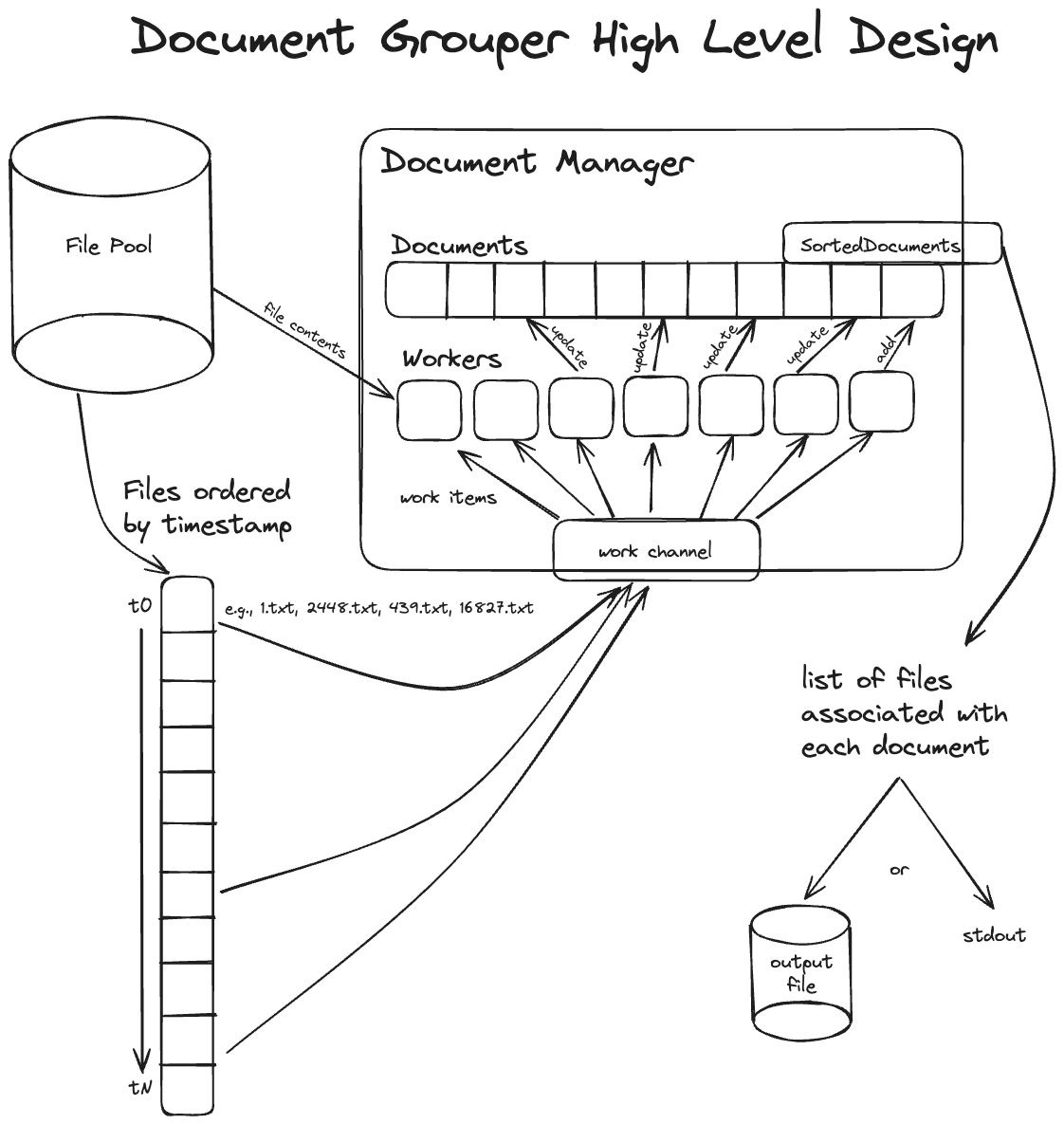
| design.png | ||
| go.mod | ||
| go.sum | ||
| main.go | ||
| main_test.go | ||

README.md
Docgrouper
Given a set of files with an integer timestamp as its first line, identify a set of documents that they represent at various points of the document's life.
Building
Building docgrouper requires Go, and can be built by
running make build. Because Go might not be installed, a Dockerfile is
provided to test and build a container image. The docker image can be built via
the docker-build Makefile target.
Running
If running via Docker, the directory where the file pool exists must be mounted
into the container, via the -v or --volume switch, like so:
docker run --volume ./host-files:/files steelray-docgrouper
This invocation is made available via the docker-run Makefile target, but this
will only invoke docgrouper with the default command line arguments since
arguments cannot be passed to a Makefile target.
Options
  -output string
        output file (default is stdout)
  -path string
        path to the file pool (default "files")
  -prefix
        use '[doc ###]' prefix for output
  -threshold float
        similarity threshold (default 0.5)
  -verbose
        enable verbose logging
  -workers int
        number of workers to use (default 2*<number-of-cores>)
Approach
To satisfy the project requirements, the following approach was used:
- Order files by timestamp, to be able to step through the "evolution" of the associated documents.
- Iterate through all the timestamps, and for all documents identified, determine whether any of the files associated with the current timestamp can be related to an existing document. For each file that remains unassociated with an existing document at this point, create a new document.
- Sort the associated files for each document in order by their filename (which is a number).
Practical considerations
The corpus provided for this assignment is comprised of 20,000 files; a substantial enough amount to take time and memory complexity into account. To manage time complexity, a pool of workers compares documents against candidate files in a parallel manner, rather than serially stepping through all the files. On my MacBook Pro M1 Max, this reduces runtime from 27 minutes to roughly five minutes. Additionally, file contents are cached to prevent repeatedly reading the same files off disk.
Cached files are purged as soon as their contents won't ever be needed again, to conserve a large amount of memory that would be used by caching the contents of 20,000 files. We can be sure a file's contents aren't needed anymore when its associated timestamp has already been processed, and the file isn't the most recent file associated with a given document: we only need the latest version of the document to associate files from future timestamps.
There is some status text written to the console by default, but it is written
to stderr, so if only the pure list of files associated with one another is
desired, redirecting stdout will yield a clean list without any status text. The
same can be accomplished by using the -output flag, as well.
High level design
The main representational types in the program are the DocumentManager and the
Document types. DocumentManager handles starting workers and comparing
documents against candidate files. The Document type keeps track of which
files are associated with it, and the timestamp of the latest file. Work is
performed by sending "work items" to the workers on a channel, who pull a work
item off and perform it, altering documents if they need to be updated with a
new associated file. When all files have been checked, the final set of
documents is presented to the user.